

From cart to spreadsheet
For supply orders, office purchases, and any list that needs to move from Amazon into a spreadsheet.
- Capture your cart. Open the Amazon cart and click the extension. You can also import a saved cart HTML file or a text-based PDF.
- Check the items. Edit names and quantities, remove items, and confirm each row. Hover over a link to preview the captured details, or open the Amazon listing.
- Choose a format and export. Use General, School, or your own Excel template. Available photos are included by default in the built-in layouts.
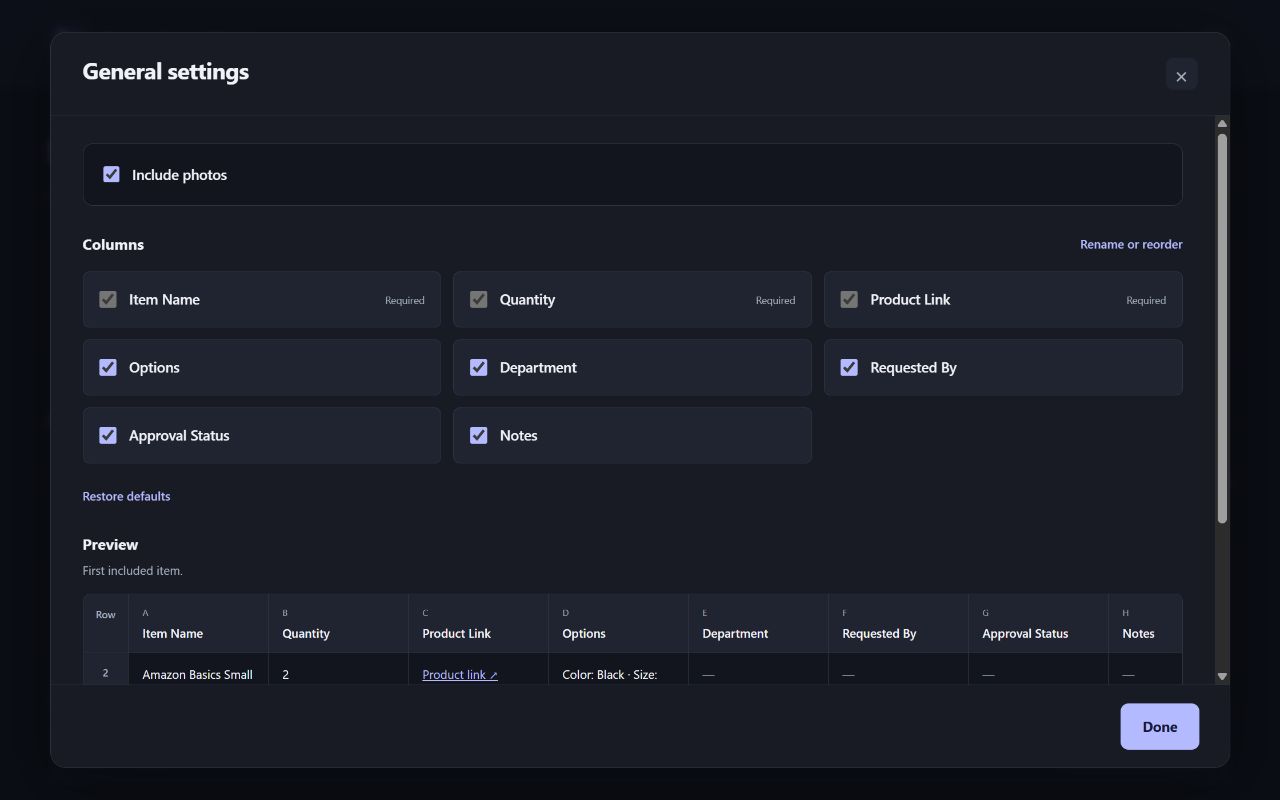
Use the columns you need
Choose and reorder columns, rename headings, or upload an Excel template and match its columns to the item details. The school format includes approval, ordered, and delivered checkboxes. Separate copy controls let you paste details and photo formulas into Google Sheets while keeping those checkbox columns in place.
Files stay in your browser
Cart processing, saved settings, and templates stay on your device. Product images load from Amazon; available photos are embedded in the exported Excel file. No extension account is required. Read the privacy policy.
PDFs may be missing links or photos, and scanned PDFs are not supported. Listing previews show captured information and may become outdated. The extension does not place orders or change your Amazon cart.
Support
Contact Jonathan Capone at hello@jonathancapone.com. Include what you were trying to do and what happened. Please remove private information from any screenshots or files you send.
Cart to Spreadsheet is an independent tool and is not affiliated with or endorsed by Amazon.