Overview

They Show Up, They Leave.

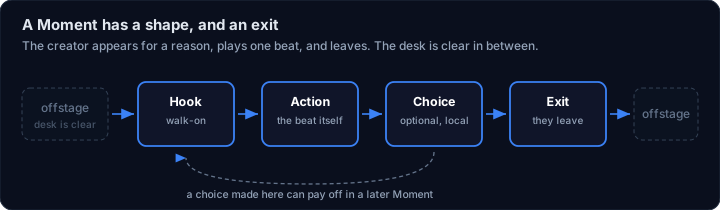
The design thesis is restraint. A creator appears for a reason (a reveal, a demonstration, a field report, a question), performs one bounded beat, and goes. Real people leave when the scene ends. So the desk stays clear between appearances instead of interrupting twice.

That rules things out on purpose. It's not an always-on talking avatar, a notification feed, a chat window, or an AI companion. Four plain words cover everything a creator builds: an Avatar (what a fan installs), a Show (an episode or campaign), a Moment (one bounded appearance), and an Asset (the video, image, audio, prop, or sprite it uses).

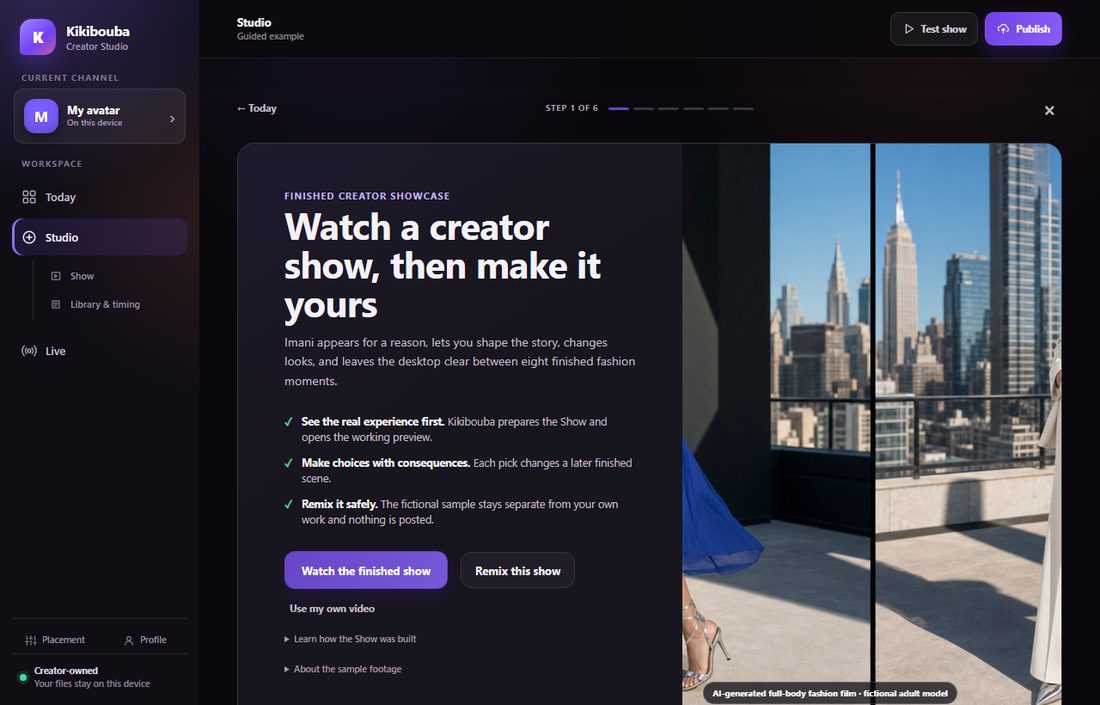
The Kikibouba Creator Studio: a sidebar with Today, Studio and Live, and a guided example walking through a finished creator show
The Creator Studio, running. A new creator lands on a finished example show and can remix it rather than start from an empty timeline. Note the footer: your files stay on your machine.
Diagram: a Moment runs offstage, hook, action, an optional choice, exit, then back offstage; a choice can pay off in a later Moment
The Creator Side

From Your Room to Their Desktop

Record from a webcam. You get a 3‑2‑1 countdown and a 30‑second cap, because short loops are the point; the camera is released the moment you leave the view, so the light never stays on. Or build the shot in OBS and record its Virtual Camera, which the app finds without quietly substituting a physical webcam.

Cutout

No Green Screen Needed

The default is matting: an AI model on your own machine traces which pixels are you, hair and soft edges included. It cuts real pixels out; it never generates a new picture of your face. Green-screen keying is optional, and you can stack the two. No frame of video leaves the computer.

Keep the Room

Video Shape

Sometimes the background is the point. Video shape crops the clip to a rectangle, rounded frame, circle, or oval, keeping the original scene inside and transparency outside. Drag it on the preview, resize, soften the edge. It's instant; no AI model, no re-encode.

Sprites

One Clip, One Animation

A trimmed clip can become a frame-by-frame animated sprite, generated on the device and checked against the real finished atlas before it lands in your library. Scope is deliberately modest: one clip, one animation. Not a character with a guessed set of states.

The Hard Parts

Three Problems Worth the Trouble

Most of the engineering went into three things that are easy to get subtly wrong.

Compositing

Looking Real on Any Wallpaper

A cutout has half-transparent pixels at every edge, and those pixels still carry the colour of the old room. That's the faint rim people describe as "I can see edges around it." So the pipeline solves for the true foreground colour instead. A Bake step then burns the result into the clip once, offline, where it can afford passes live keying never could.

Honest Preview

The Checkerboard Rule

The moment a clip exists you get a split preview: original on the left, cutout on the right, composited over a checkerboard. A checkerboard is the only honest way to show that a cutout is really transparent. A pretty backdrop can hide a bad edge; a checkerboard can't.

Overlay

On Top Without Taking Over

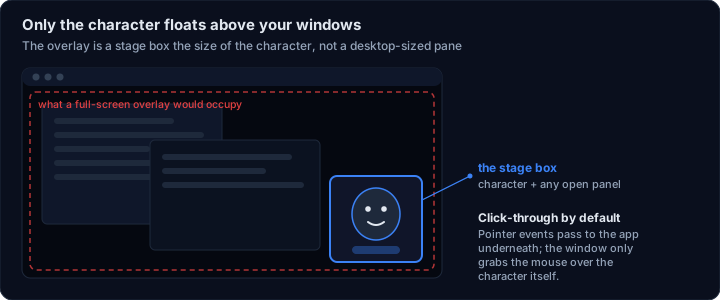
An always-on-top window is a good way to ruin someone's desktop. So the overlay is a tight stage box, no bigger than the character plus whatever panel is open, and it starts fully click-through: clicks pass to the window underneath. It becomes interactive only when the pointer is genuinely over the character, then goes back to being scenery.

Diagram: the overlay is a small box around the character, not a full-screen pane, and it is click-through except over the character itself

And a fourth: not faking engagement

Kikibouba never processes fan payments. Support buttons deep-link to pages the creator already owns, and the app discloses where a link goes before opening it. Poll and action clicks stay local to the fan's machine and never invent audience activity, so a creator can't be shown numbers that aren't real. The spec's rule is blunt: a visible action must work end to end, be disabled with a prerequisite you can actually satisfy, or not be there.

Build & Status

Honest Status

Working Prototype

What Runs Today

A desktop build on Electron (v33, Windows-first): the fan-facing Player and its transparent, frameless overlay, with the local Creator Studio launched separately. No bundler, no UI framework, no external CDN; renderers are plain ES modules and it all works offline. A --smoke start-up flag creates both windows hidden and reports pass or fail, so a broken build fails loudly.

Direction

Where It's Going

The desktop Studio is explicitly the transition implementation, not the intended customer experience. The plan splits it. Studio moves to a hosted web app; the desktop becomes the Player, fan-facing, no creator tools, several avatars running independently. Reply drafting (never auto-sent; every message human-approved) is designed but deferred.

About the name

It was called Deskmates. Kikibouba is the product name now, but the rename stopped at the surface on purpose: the deskmates.* API namespace, the deskmate:// protocol, and the .deskmate package and data files keep their original identifiers. Those are compatibility contracts; renaming them would break existing clients and creator content for no user-visible gain. A product name is marketing; an on-disk format is a promise.