Overview

Bring Your Character to Life.

CosNFX brings cosplay, LARP, and stage-magic characters to life: natural arm movements (a punch, a wrist flick, an overhead raise) fire high-fidelity sound effects and elemental energy bursts straight from the wrist. It runs as a standalone Wear OS app (leave the phone at home), tested on a Galaxy Watch 7.

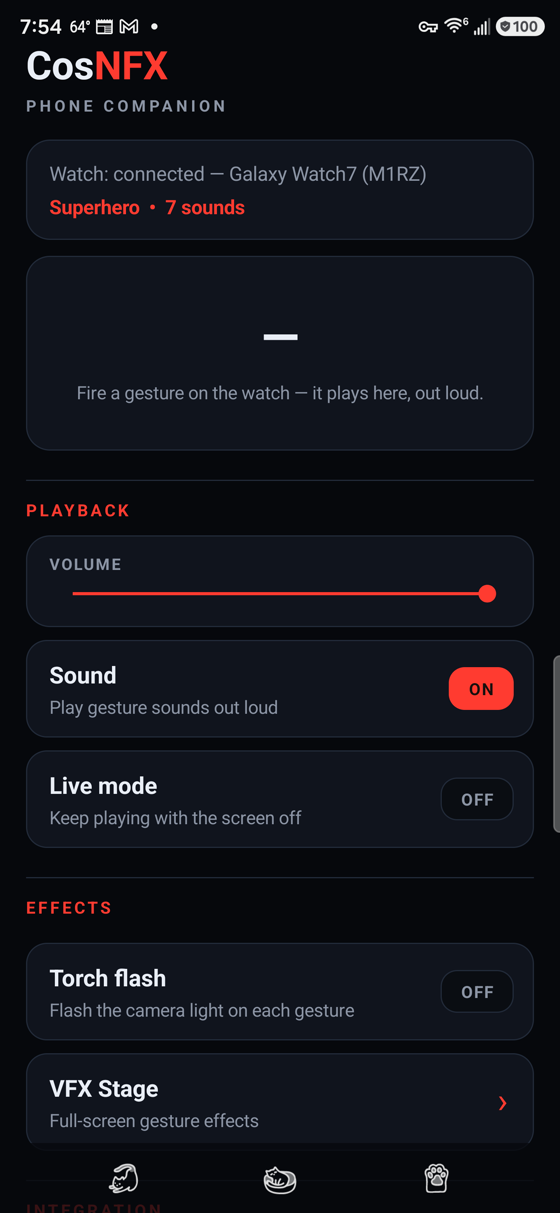
Each character is an identity with its own colour, sound kit, energy field, and cinematic backdrop: 30 built-ins (heroes, monsters, and mages: Superhero, Cyborg, Pyromancer, Vampire, Reaper, Werewolf, Robot, and more) plus your own. A phone browser is all you need: assign gestures, upload your own .wav/.mp3, chain gestures into combos, route audio. The phone companion app mirrors that whole control surface natively over the Bluetooth data layer, down to the same shaped pads on its own live ring, so it keeps working at a venue with no Wi-Fi.

On Google Play   Kotlin + Jetpack Compose (Wear Material 3) · built across a watch app and a phone companion · com.jdcap.cosnfx v2.11.2 live, v2.13 in review. Free to install, with an optional one-time Pro in-app purchase.
At A Glance

Watch Core, Phone Mission Control

The watch is the impact core; the phone is the configuration surface and an optional second speaker. A single Android foreground service (HeroService) owns the audio engine, the sensors, and an embedded web server, so they survive the screen sleeping or the app backgrounding.

Watch

One Always-On Service

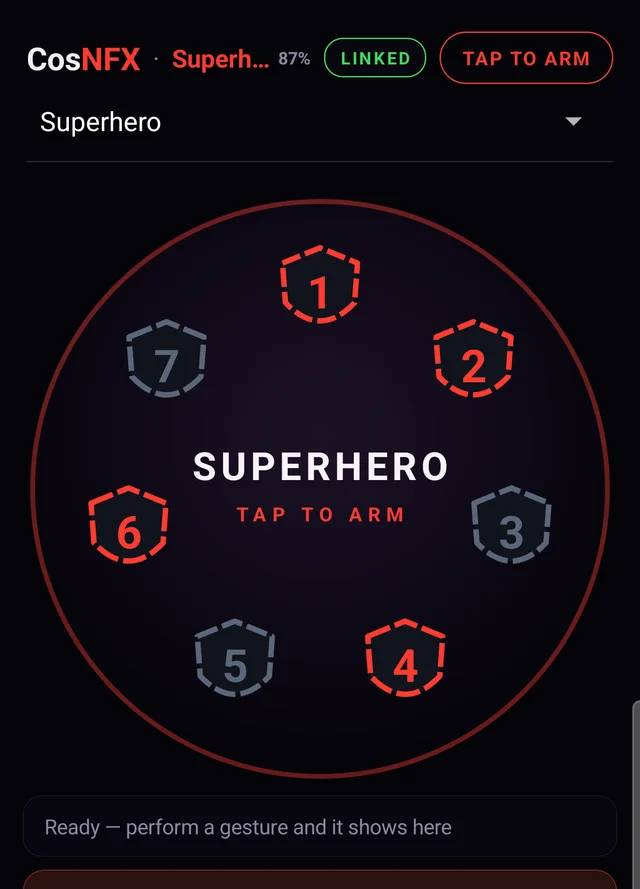
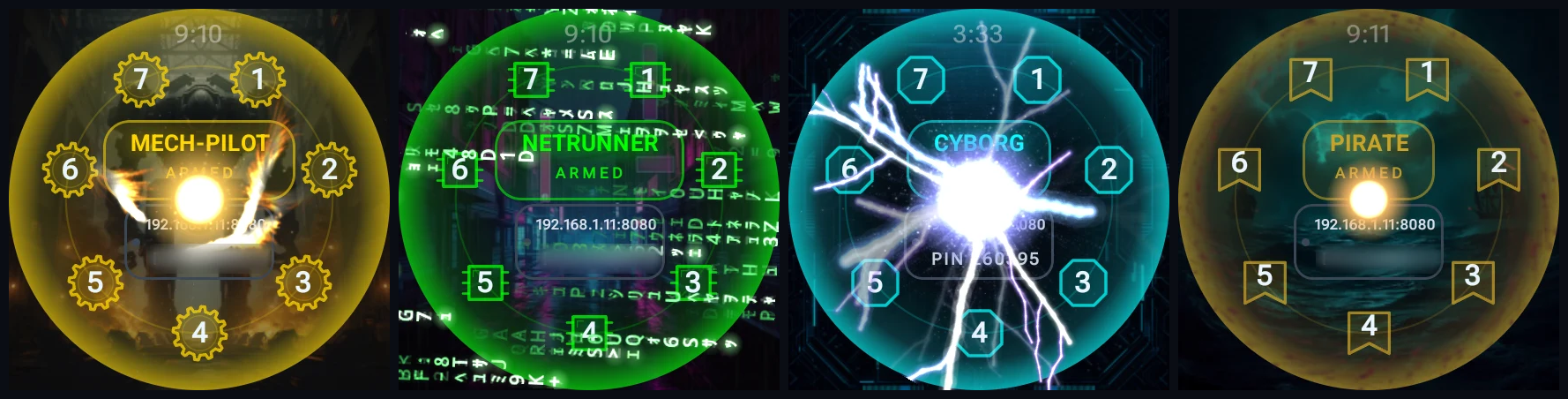
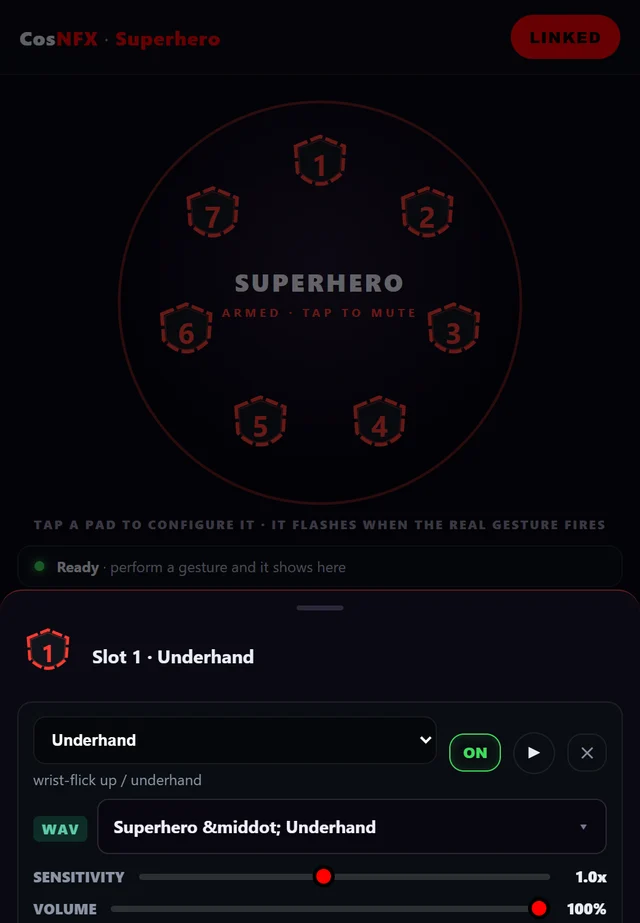
A single background service (HeroService) hosts the self-healing AudioTrack engine, reads the watch's motion sensors, and detects your gestures. The watch UI is one page, a Clean HUD: the identity name is the arm toggle, ringed by numbered 1–7 gesture pads over a cinematic per-identity backdrop. Each pad is drawn in the silhouette of its identity, so the button shapes themselves tell you who you are wearing.

Phone

Mission Control in Your Browser

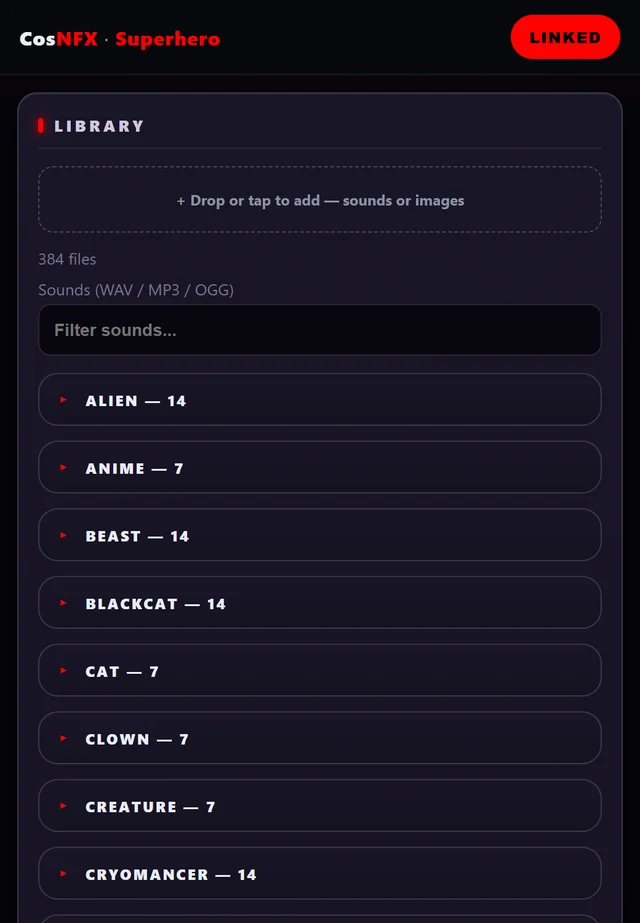
The watch runs an embedded Ktor server on :8080; any phone browser on the same Wi-Fi opens it over REST + a WebSocket event stream, gated by a 6-digit pairing PIN shown on the watch. The browser is the whole client. The panel is built around the Stage: your seven buttons drawn as a live ring, each pad shaped by the identity it belongs to. Tap a pad to set its gesture, sound, and effect; pads flash as you perform; tap the centre to arm. Four zones (Stage, Show, Library, System) hold the rest, and a searchable sound browser with on-watch preview replaces the long dropdowns. The companion app mirrors the same four zones natively over Bluetooth, and can only reach an approved set of commands. (The Stage redesign ships in 2.13, in review now; 2.11.2 serves the earlier tabbed panel.)

Visuals

Per-Identity Energy Fields

Each identity renders a transparent particle energy field over its cinematic backdrop: a native Kotlin port of the web visualization engine (dozens of built-in effects) running on a render-thread SurfaceView with additive bloom, frame-throttled so it pauses when the screen's off. (The old AGSL GPU shader and the earlier Compose-Canvas effects are retired.)

Audio Engineering

Low-Latency by Design.

CosNFX streams raw 16-bit PCM straight into a hardware AudioTrack on a MAX_PRIORITY thread, requesting PERFORMANCE_MODE_LOW_LATENCY (the fast HAL path, with a fallback build for devices that reject it). That skips the standard Android media players and the 40–100 ms of round-trip latency they add, which is far too long for a sound triggered by a physical wrist flick.

The engine is self-healing: build, play, and render are wrapped in a retry loop that releases and rebuilds the track after a Bluetooth/audio-focus change (which used to throw uncaught and kill the process). Writes use 256-sample chunks (~6 ms: latency negligible, far fewer underruns). To save power the track pauses when idle, but that pause is arm-gated: it stays warm (~2.5 s) while armed so every gesture in a performance fires instantly, and pauses fast (250 ms) when disarmed.

Sensor Fusion

Measured-Axis Gesture Detection

The hard problem is firing on a real gesture and never on natural conversation. Measurement settled it: on this Galaxy Watch 7 the sensor axes sit differently from what the docs assume, so each gesture is keyed to the axis it actually drives (read from a live on-watch inspector).

Measured axes

One Axis Per Gesture

Gravity X is the arm up/down axis (gravity Y stays ~0 in every pose), gating the armed state and the overhead Raise. The two wrist flicks (Underhand / Overhand) read gyro X; the thrust and impulse moves (a forward Strike, a superhero-landing down-punch, a hip thrust, and a Fist clench) each key off the accel axis they actually drive, picked by which signal dominates so they can't trip each other. (The fist clench replaced a finger-snap detector after on-watch measurement proved a real snap's impulse sits below ordinary arm movement at the 100 Hz sensor ceiling; the data said no, so the gesture changed.)

Anti-cross-talk

Reorientation Suppression

A fast vertical sweep of the arm (Δgravity X > 1.0, i.e. you're raising it) mutes the twitchy accel detectors for 400 ms, so the swing itself can't trip a thrust. All lanes share a 350 ms global cooldown (one gesture per motion), and a hands-free double-tap arms or disarms above all of it.

Calibration

Teach the Watch Your Motion.

Fixed axes fit how the prop sits on this wrist and how this performer moves; a very different pose can drift. So calibration is built in: record a built-in impulse gesture a few times and the watch auto-aims that gesture's detector at the channel your motion actually drives, fitting detection to you instead of a hard-coded axis.

It's per-gesture (Calibrate / Redo), with Recalibrate-all and Reset-to-defaults, and it's an opt-in backup, never a regression: an uncalibrated gesture keeps its built-in detection unchanged, and an under-sampled capture is rejected rather than saved.

Props & Output

From the Wrist to the Room

A gesture can reach past sound: it can fire an external action and be routed across devices.

Props

External Lights & Devices

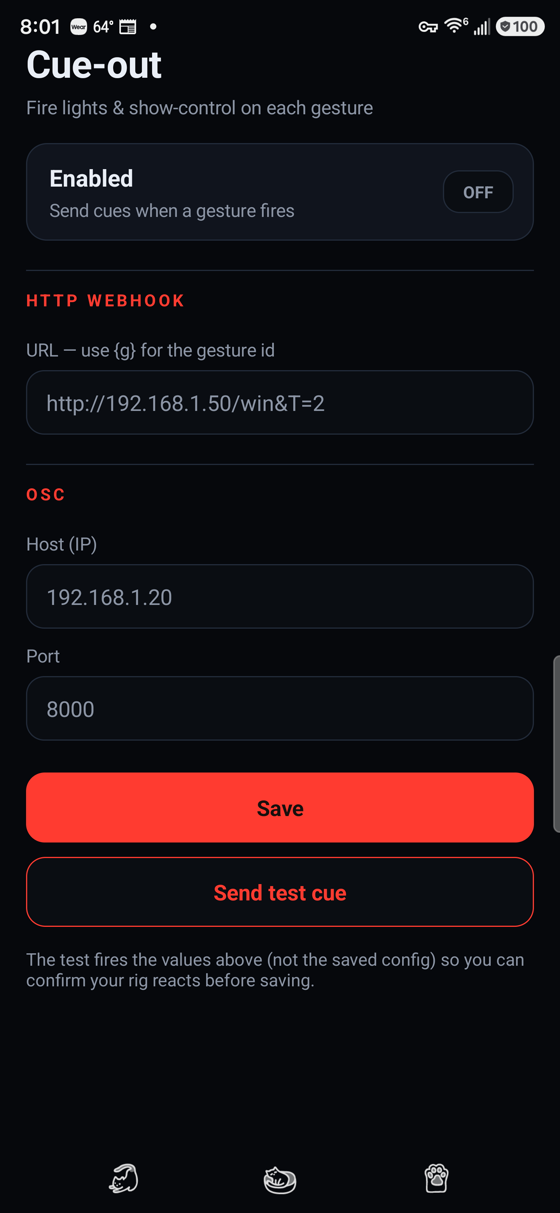
An opt-in per-gesture action fires alongside the sound. An HTTP call drives anything with a local web API: WLED strips, Philips Hue, Home Assistant (smoke machines, fans), DIY ESP32/Arduino. OSC and DMX (Art-Net) reach lighting consoles and show-control rigs, so one move can flash a costume and cue a fog burst together. Each row has a Test button, and HTTP targets are scoped in code to private LAN addresses (anything public is forced to HTTPS).

Audio routing

Multi-Device Audio & Battle Mode

A main/support mix routes independently across three outputs: the watch, the phone companion app, and the Mission Control browser tab. So the main hit lands on a loud phone speaker while a support layer stays on the wrist (any mix, or silence either), and a gesture can play across several devices at once. An opt-in Battle mode links two or more watches over Wi-Fi for versus play: a strike deals damage, a held Raise blocks, and health regenerates while disarmed.

Engineering Reality: Battery vs. Latency

A performance prop has to stay instant without draining the watch mid-show. Sensors run full-rate only while armed and downshift when disarmed; the audio track stays warm while armed and pauses fast when not. The screen (kept on while armed) is the real drain, so the watch auto-disarms after ~15 minutes idle (any gesture resets it), letting the screen sleep and the watch fall to its idle floor. CosNFX is published on Google Play and still actively developed.

On Google Play

Shipping, Free, Ready to Wear

It is on the Play Store as CosNFX: Costume Gesture SFX, built and tested on a Galaxy Watch 7. Halloween and convention costumes are the obvious home for it, but it works for anything you wear that ought to make a noise.

Free

All 30 Identities Included

The download is free and so is the whole library: all 30 identities and every sound and visual in them. There is one optional one-time Pro unlock for the deeper controls; you pay once and keep it.

No account

Install and Perform

It runs on your own devices, with no account, no ads and no telemetry. For a costume app worn in a crowd, that's what matters.

Local only

Mission Control on Your Own Wi-Fi

Setup happens in a browser on any phone or laptop on the same network, unlocked by a six-digit PIN the watch displays. Connections never leave the local network, which matters on shared convention Wi-Fi.

What the Pro unlock adds

Recording your own gestures and calibrating them to the way you personally move; bringing your own WAV, MP3 or OGG audio and your own artwork; and routing sound to the watch, the phone or a browser, or to several of them at once. Useful if your costume has a speaker in the chest and you want the sound to come from there.