Overview

Planetaria.

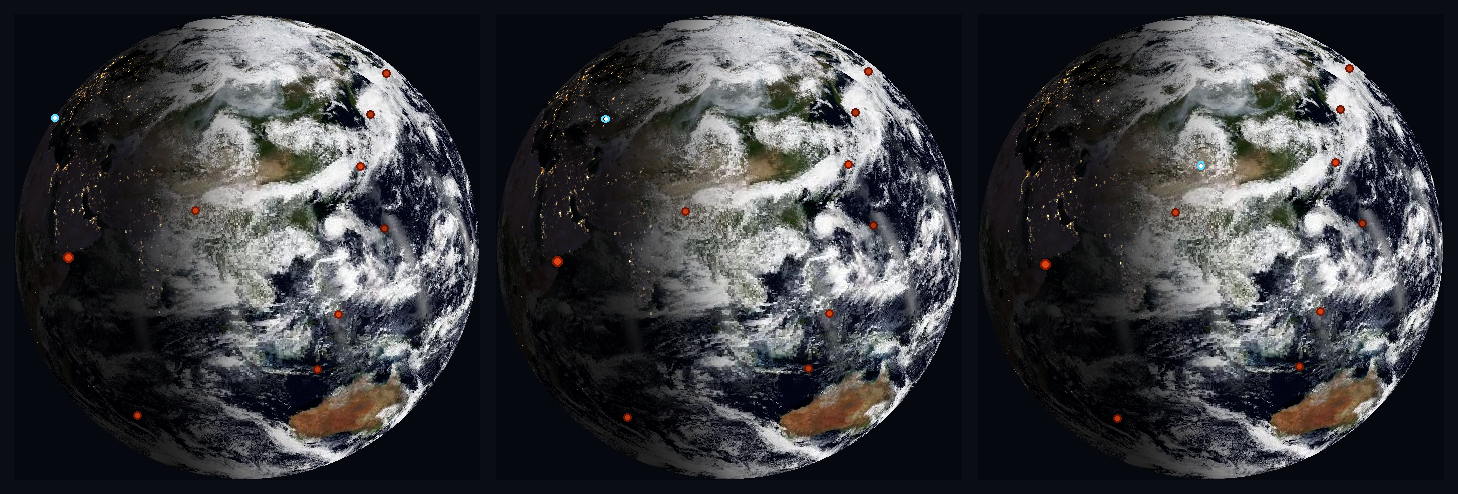
Planetaria is a standalone, internet-connected desk display built on an ESP32-S3 microcontroller. On its 1.75" round AMOLED it renders a live, sun-synchronous Earth: the true day/night terminator computed each frame, daily cloud cover composited from two NASA VIIRS satellites, and city lights that come on only where night has actually fallen. A settings-page tap switches it to any of eleven views: nine more worlds, the Moon with tonight's real phase, or a live planisphere of the stars and constellations above your location, with the ISS tracked across the globe.

It runs entirely on the device, and everything needed to set it up ships inside it. Setup is a built-in captive portal (including enterprise 802.1X school and work networks), configuration is a web dashboard, and a sealed case can always be returned to setup by switching the power off and on three times. Every data source is keyless and licensed for commercial use. It ships as a product through the CosNFX store.

Features

Key Features

Live Sun-Synchronous Earth

Calculates the real-time position of the sun to accurately drape a soft twilight terminator (day/night line) across the globe.

Dual-Satellite Cloud Cover

Composites daily imagery from NASA's NOAA-20 and Suomi-NPP VIIRS satellites, destripes swath-edge artifacts, and gap-fills from the previous day's mosaic; storms are real, current, and continuous.

Dynamic Night Lights

Renders NASA "Black Marble" city lights exclusively on the shadowed hemisphere of the Earth.

Eleven Views + Live Cards

Earth, Mercury through Neptune, the Moon, the Sun, and a live Night Sky (switched live from the settings page while the globe keeps running), plus scheduled pop-up cards for time & weather and the tide. The Moon is tidally locked like the real one, and its terminator is tonight's actual phase.

Night Sky Planisphere

The stars and constellations above your location right now (Yale Bright Star Catalogue + d3-celestial figures), the Moon drawn phase-correct at its true position, and the five naked-eye planets as colour-coded dots, from an on-device Keplerian ephemeris validated against JPL Horizons to 0.077ยฐ. The whole sky wheels with the clock, or with the time-lapse.

Tide Card (US coasts)

On a schedule you choose it pops up like the weather card: the nearest NOAA station's water level right now (rising, falling, or the turn of the tide), today's true curve drawn from hourly NOAA predictions, the next high and low, and the Moon that drives it all.

Earth Pulse: Live Earthquakes

Recent USGS earthquakes (M4.5+, past day) pulse on the globe at their real epicentres, larger for stronger quakes, fading as they age. The Pacific Ring of Fire, visible from your desk.

The Space Station, Live

A marker rides the globe at the ISS's real position, propagated on-device from CelesTrak orbital elements (two-body + J2). In time-lapse it visibly orbits, the ground track corkscrewing westward pass after pass.

Local Time & Weather Card

On a user-defined schedule (every 30 minutes out of the box), the globe transitions to a full-screen card with local time, date, temperature, "feels like," humidity, and wind, then returns to orbit.

Web Settings & Demo Tour

A local web dashboard adjusts motion (true 24-hour rotation to fast time-lapse), brightness with optional auto-dim after local sunset, tilt, rotation, and more, plus a one-tap two-minute demo tour through every view that restores your settings when it's done.

Hardware

Specifications.

  • Display: 1.75" round AMOLED, 466 ร— 466 pixel resolution (CO5300 QSPI driver).
  • Microcontroller: LilyGo T-Display-S3 (Espressif ESP32-S3, dual-core 240 MHz).
  • Memory: 8 MB PSRAM / 16 MB Flash.
  • Connectivity: WiFi 802.11 b/g/n (2.4 GHz), WPA2-Personal and Enterprise (802.1X).
  • Power: 5V via USB-C.
Software

Architecture.

  • Firmware: the entire device program is a single C++ file, built with PlatformIO on the Arduino framework.
  • Multi-Threading: FreeRTOS across both cores. Core 1 runs the render loop uninterrupted while Core 0's tasks own all texture and weather mutations, publishing by atomic pointer swap so a network fetch can never stutter or tear a frame.
  • Data APIs: Entirely free, keyless, and commercial-use-licensed: NASA GIBS/VIIRS (clouds and maps), MET Norway (weather), geojs.io (geolocation and timezone), CelesTrak (ISS orbital elements), and NTP.
  • On-Device Astronomy: The NOAA solar position, an Astronomical Almanac lunar series (validated against JPL Horizons to 0.17ยฐ), a two-body + J2 satellite propagator, and a sidereal-time star chart are all computed on the microcontroller itself.
  • Offline Resilience: If the network drops, the globe continues on cached time and cloud assets and resumes background updates when the connection returns.
  • Host-Side Tooling: a Python toolkit: texture and atlas generators, host replicas of the renderer, and validation sims that check the firmware's math against external ground truth (JPL Horizons for the Moon and planets, a live reference for the ISS, Sirius calibration for the star catalog, NOAA's own curve for the tide dial).
At A Glance

A Globe Computed Frame by Frame

Each frame begins from the true subsolar point (NOAA solar position) for the current UTC. From there the globe composites NASA VIIRS daily cloud mosaics from two satellites and additively blends NASA Black Marble city lights on the night side.

Rendering

Flat Maps onto a Round Screen

A precomputed table maps every pixel on the round screen to a point on Earth's surface. Neighbouring map pixels are blended as it samples, so the globe stays smooth right down to the pixel; that smoothing is tucked into spare space in the table, so it adds no memory cost. A fine dither pattern hides the colour banding the display's 16-bit colour would otherwise show.

Pipelines

NASA Cloud Ingest

A background task fetches the daily two-satellite cloud image (2048ร—1024) and shrinks it into a working texture (averaging four source pixels into each one, which cleans up noise), then removes the stripe artifacts at the satellites' swath edges, smooths the seam at the dateline, and swaps the new clouds in without interrupting the display.

Verification

Host Replicas & Frame Capture

The renderer has Python replicas on the desktop, and the firmware exposes a deterministic capture endpoint that renders any requested simulation time on demand. The product video is rendered frame-by-frame this way: marketing material that doubles as a frame-exact test rig.

Robustness

Cloud Completeness

A freshly-built daily mosaic has missing satellite swaths, so completeness is judged by no-data pixels in the mid-latitude band only (polar night is legitimately black). Incomplete days are rejected back up to 7 days, and remaining gaps are filled from the previous mosaic, colour-matched, so clouds continue across the seam.

By The Numbers

Scope

Honest figures, read straight from the repository: a single-purpose firmware plus the host tooling that feeds and verifies it.

Single-file firmware

The entire device program in one file, firmware/src/main.cpp (C++ / Arduino), backed by a Python host-tooling suite in backend/.

Ten worlds + a star map

Ten surface textures (one per world), NASA's Black Marble night-lights layer, a packed font/icon atlas, and a compiled-in star catalog of 1,010 stars and 743 constellation segments. All stored on the device.

12 views

Ten sun-shaded worlds, the live Night Sky planisphere (with the naked-eye planets), and a live NOAA tide dial, with the ISS and USGS earthquakes tracked over Earth; targeting the LilyGo T-Display-S3 AMOLED (ESP32-S3, 8 MB PSRAM) via PlatformIO.

Deep-Dive Diagnostics

Engineering the Edge Cases.

The real story of embedded systems lies in the hardware edge cases. Here are four critical bugs (and one non-bug) resolved during field-testing:

1. The Odd-Aligned CO5300 AMOLED

Text rendered perfectly on the host replica but garbled randomly on the physical panel. Root cause: the CO5300 display driver passes raw x/y/w/h coordinates without rounding. Any partial SPI write with an odd dimension shifts and corrupts the hardware buffer. The fix: strict even-padding on every text blit.

2. Sub-Second NTP Judder

During time-lapse animations, the globe would hold still for 30 frames then awkwardly lurch forward. The underlying NTP clock was bound to time(nullptr), which is whole-second granular. The fix derived a sub-second fractional offset using millis(), re-anchoring on every RTC tick, so the spin advances smoothly between clock ticks.

3. The Phantom Station Hotspot

When the globe was moved to a new house, the captive portal refused to load on 192.168.4.1. The ESP32's SoftAP channel strictly follows the Station radio. The radio kept hunting for the old home network saved deep in the driver, dragging the hotspot off-channel. The fix: explicitly wipe the persistent driver credentials and serve the portal in pure WIFI_AP mode.

4. The Satellite That Wouldn't Move

Two ISS lessons. First, a real bug: the time-lapse clock races ~30 days per real hour, and a staleness guard comparing it against the orbital-element epoch silently expired after 19 minutes; staleness checks must always use the real clock. Second, a non-bug that survived a frame-by-frame audit of 432 captured frames: in the sun-locked view the marker retraces the same screen arc every orbit. Correct physics: a sun-fixed camera is nearly inertial, so the orbit ring holds still and it's Earth that slides beneath it.